Ai证件照生成器:白底证件照与指令模板

智能生成白底证件照,支持底色切换与证件照指令

Ai证件照 · 白底证件照 · 指令模板

我的创作
Nano-Banana
Nano-Banana
Before
Before

Turn a Selfie into a White Background ID Photo

Upload a clear front-facing portrait and enter a white background ID photo prompt. AI removes the original background, applies a clean solid background, and adjusts head position, shoulders, and spacing for resumes, applications, passports, and visa materials.

Nano-Banana
Nano-Banana
Before
Before

AI ID Photo Prompts Make Results Easier to Control

When you know the required background, size, lighting, or use case, describe it directly in the prompt. Include terms such as white background, 1-inch, front-facing, head centered, shoulders visible, and clear facial features for more stable results.

How to Write an AI ID Photo Prompt

Copy one prompt into the ID photo requirements box, then adjust background color or size for your use case.

White Background ID Photo

White background ID photo, front-facing, head centered, shoulders visible, clean white background with no shadows, clear facial features, natural skin tone, no heavy retouching.

Works for resumes, applications, and general white background ID photo needs.

1-Inch Application Photo

1-inch ID photo, 25x35mm, white background, front-facing portrait, natural expression, face about 70% of image height, even lighting.

Useful for application photos, school forms, and document uploads.

Passport or Visa Photo

Passport ID photo, white or light background, looking straight at the camera, head centered, shoulders natural, clear face, realistic facial features.

Requirements vary by country and organization, so verify the official size before submission.

ID Photo Composition References

Open-source examples show clean white backgrounds, head spacing, face position, and shoulder framing for standard ID photos.

白底证件照样例图

White background ID photo sample with clear face and complete shoulders

Source: GitHub hjt486/ChinesePassportPhotoMaker (MIT License)

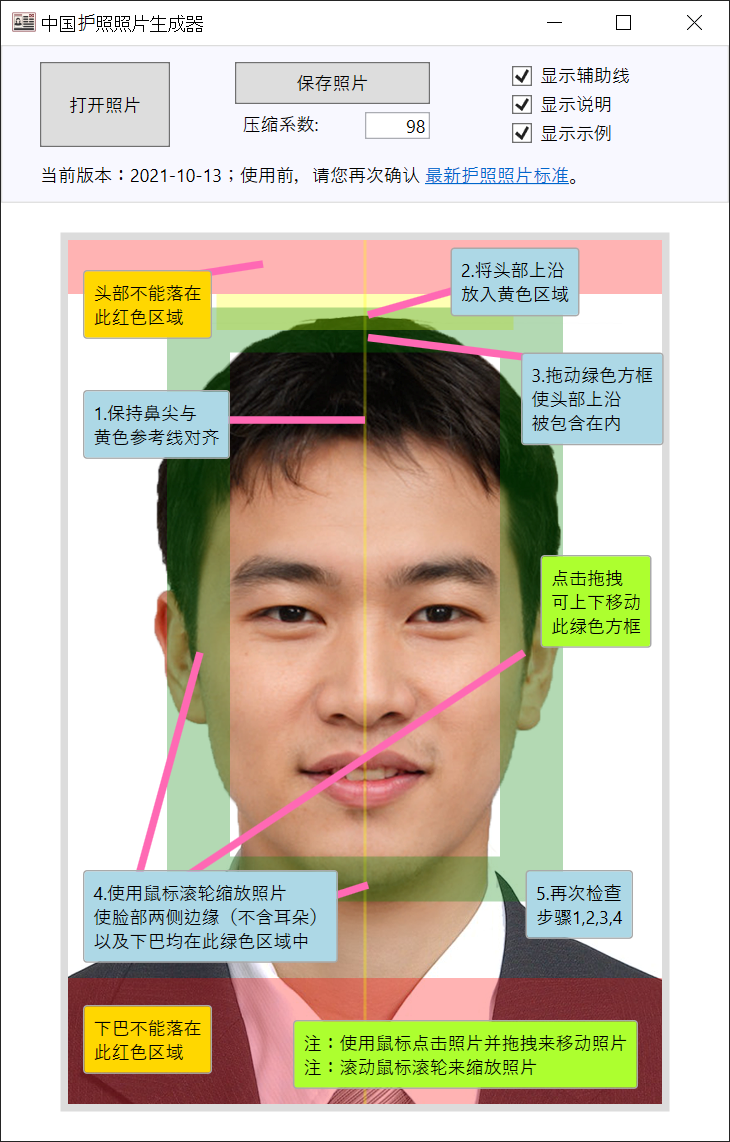
证件照头部位置与裁切参考图

Head-position reference with guide lines for top, chin, and centered face

Source: GitHub hjt486/ChinesePassportPhotoMaker (MIT License)

Create a White Background ID Photo in 3 Steps

Choose the use case, upload a portrait, then download the final image.

01

Upload a Front-Facing Portrait

Use a JPG, PNG, or WebP image with even lighting, visible facial features, and no heavy occlusion.

02

Enter an ID Photo Prompt

Specify white, blue, or red background plus 1-inch, 2-inch, passport, visa, application, or resume use case.

03

Preview and Download

Check head position, background cleanliness, and face clarity before downloading for applications, resumes, documents, or printing.

Why Choose NanoBanana AI ID Photo?

White background ID photos, background colors, size guidance, and reusable prompt templates

📷

Smart Background Swap

Powered by Google Gemini, precisely detects portrait outlines and replaces with standard solid backgrounds (white/blue/red)

🎨

Multiple Background Colors

Supports white, blue, and red backgrounds covering passports, visas, exam registrations, resumes, and all common ID photo needs

📐

Standard Composition

AI automatically adjusts head position and shoulder proportions to meet ID photo size and composition standards

10-Second Generation

Simply upload your photo — no photo studio visit needed. Fully automated in 10 seconds, anytime, anywhere

High Approval Rate

AI moderately optimizes facial lighting and skin tone while keeping features natural, ensuring approval for registrations and visa applications

🔒

Privacy Protected

Your photos are only used for this processing session and are not permanently stored. Your personal privacy is guaranteed

About NanoBanana AI ID Photo

NanoBanana AI ID Photo is an AI-powered ID photo generator built on Google Gemini. Upload a selfie or casual photo and AI automatically removes the background, adjusts composition, optimizes lighting, and generates white background ID photos, blue background photos, red background photos, and common application photos. The page includes reusable AI ID photo prompts for passports, visas, exam registrations, work IDs, and resumes.

User Feedback

Common ID photo workflows for applications, resumes, and document uploads.

I needed a white background ID photo for an application. The prompt template made the background clean and the head position much easier to control.

Zhou

Application User · Wuhan

I used to visit a studio for every document photo. Now I can generate white and blue background versions from one phone photo.

Chen

Workplace User · Shenzhen

The useful part is being able to describe background, size, and lighting in one prompt. The result is closer to what I need.

Wu

Document Upload User · Nanjing

AI ID Photo FAQ


AI ID Photo Generator - White Background Photo Prompts | NanoBanana