
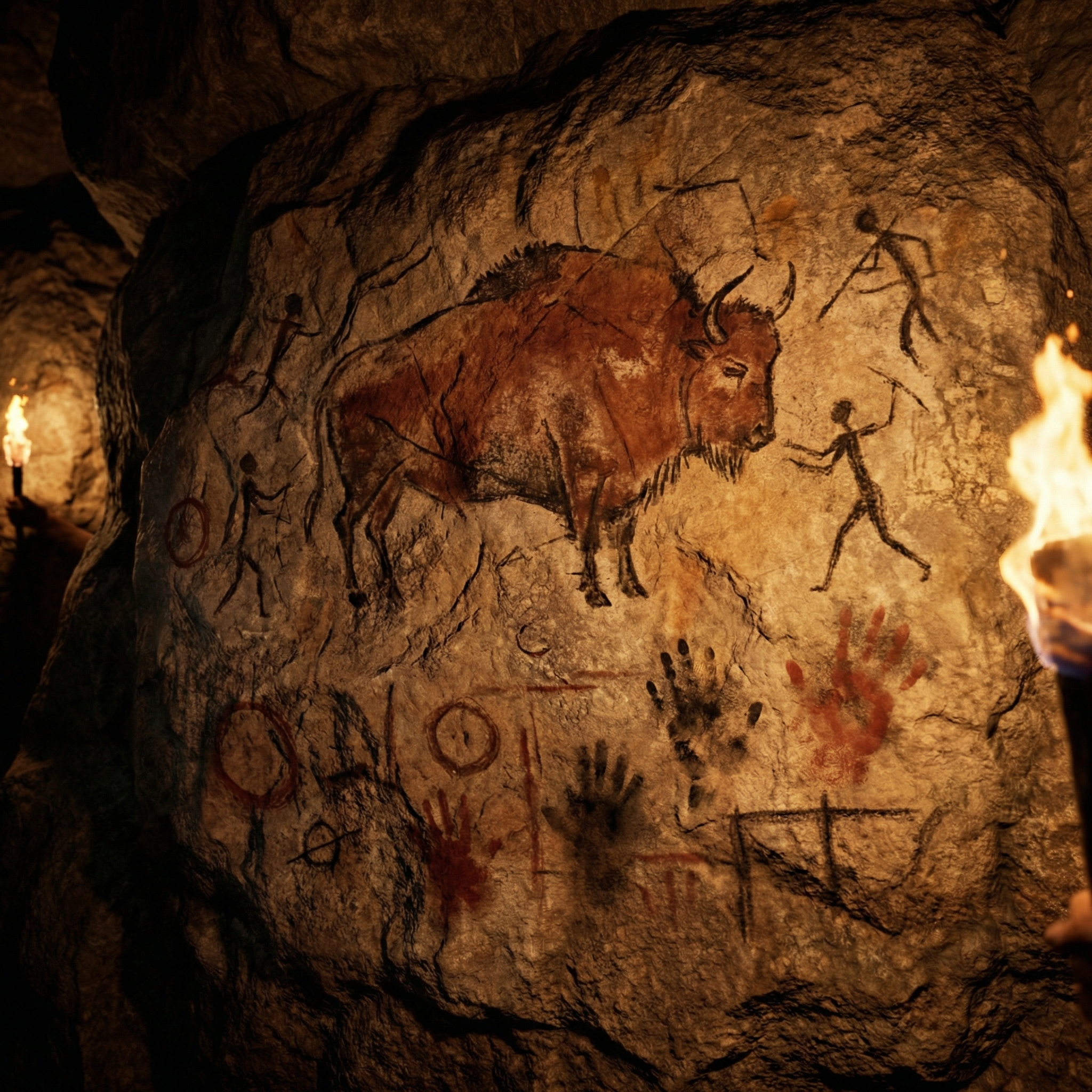
On a rough stone wall, ochre and charcoal depict running bison, smudged handprints, and mysterious geometric symbols, while torchlight casts dancing shadows across the uneven surface. When generating this "primitive cave painting" effect with AI, nearly everyone hits the same wall: the paint looks like it's printed on smooth paper rather than soaked into rough stone. The painting and the rock exist as two separate layers, not as one.
This article identifies the root cause and fixes it with 2 material anchoring parameters.
The Effect You Want
A successful cave painting must satisfy three conditions simultaneously:
- Paint "sinks into" the rock: Ochre and charcoal lines follow the rock wall's uneven contours — lighter on raised areas, deeper in crevices — not flat-printed on a smooth surface
- Rock wall has physical presence: Cracks, mineral crystallization, water stains — these aren't "background texture," they're co-stars of the image
- Torchlight creates dynamic illumination: Not uniform studio lighting, but unstable warm light from one direction, creating dramatic light-dark contrast across the rock wall's contours
Why "Paint Floating on Surface" Always Happens
Root Cause: AI Treats "Painting" and "Rock Wall" as Two Independent Layers
When you write cave painting on a stone wall, AI's processing logic is: first draw a cave painting (flat pattern), then draw a stone wall (textured background), then composite them together. The result is a painting pattern "floating" on the rock — like a sticker on stone, not paint applied directly to stone.
The critical difference:
- Sticker effect (wrong): Painting lines are smooth, even thickness, uniform color — ignoring rock texture entirely
- Real cave painting (correct): Painting lines deform following rock contours, accumulate more pigment in crevices, wear thin on protruding edges
Solution: Force AI to Render "Paint-Rock Physical Interaction"
Two levels of anchoring are needed:
- Macro perspective anchoring: Make AI render from a macro photography viewpoint — when the "lens" is close enough, AI must process the relationship between pigment particles and rock texture
- Rock texture anchoring: Emphasize that the rock wall isn't "background" but "canvas" — paint behavior must be constrained by the rock's physical shape
Complete Prompt + 2 Material Anchoring Parameters
A cave painting of a [SUBJECT], rendered with primitive
ochres and charcoal lines on a rough stone wall. Smudged
handprints, crude geometry, and flickering torchlight add
a primal, ancient mood. Dark shadows, high-detailed rock
texture, macro photography of cave wall.
Two key material anchoring parameters:
| Parameter | Position in Prompt | Function | Why It Works |
|---|---|---|---|
rough stone wall |
Canvas description | Rock texture anchoring | rough forces AI to render uneven surfaces rather than smooth walls |
macro photography of cave wall |
Ending modifier | Macro perspective anchoring | Macro viewpoint forces AI to process pigment-grain-level detail, naturally "embedding" paint into rock |
Reinforced Version (For Stubborn "Sticker" Problems)
If the basic version still shows paint floating on the surface:
A cave painting of a [SUBJECT], rendered with primitive
ochres and charcoal lines directly applied onto a rough,
uneven stone wall. The paint follows the contours of the
rock surface — thicker in crevices, thinner on raised
areas, and partially worn away on protruding edges.
Smudged handprints, crude geometry, and flickering
torchlight add a primal, ancient mood. Extreme close-up,
high-detailed rock texture, macro photography of actual
cave wall surface.
Three new constraints added:
directly applied onto— paint is applied directly on stone (not composited)follows the contours of the rock surface— paint follows rock contoursthicker in crevices, thinner on raised areas— specific description of paint distribution across rock topography
Step-by-Step Guide
Step 1: Choose a Prehistoric Theme
4 recommended theme templates:
| Theme | Prompt Phrasing | Visual Effect | Historical Reference |
|---|---|---|---|
| Running bison | a stampede of bison running across the wall | Most classic cave painting subject, dynamic tension | Lascaux Cave (France) |
| Hunter vs mammoth | a hunter with a spear confronting a mammoth | Human-beast confrontation, strongest narrative | Altamira Cave (Spain) |
| Celestial patterns | mysterious celestial patterns with dots and circles | Abstract mystery, implies ancient cosmology | Pueblo petroglyphs (USA) |
| Handprint array | dozens of overlapping handprints in ochre and charcoal | Pure human traces, most directly powerful | Sulawesi caves (Indonesia) |
Step 2: Post-Generation Check
Check 2 key indicators after generation:
- Does paint "sink into" the rock? Zoom in on painting lines — lines should vary in thickness and depth following rock contours. If lines are smooth and uniform, use the reinforced prompt
- Does the rock wall have "weight"? The wall shouldn't be a blurry gray background — it should show clear cracks, mineral spots, and water stains. If it's too flat, add
ancient weathered stone with visible mineral deposits, cracks, and water stains
Step 3: Fine-Tune Torchlight Direction
Torch direction determines how rock contours distribute light and shadow:
- From below (default
flickering torchlight): Most immersive "exploring with a torch" feel; upper rock protrusions get bright bottom edges - From the side: Add
torchlight coming from the left side; rock texture becomes more three-dimensional - Multi-directional scatter: Add
ambient light from multiple small fires; reduces shadow contrast but increases visible detail
Fine-Tuning: From 60 to 90 Points
Technique 1: Weathering and Flaking
Add: parts of the painting are naturally faded and flaking away, revealing bare rock underneath
Effect: Parts of the painting have flaked off — exposing bare rock beneath. This "damage" isn't a flaw but a design choice: it implies the painting has existed for tens of thousands of years, eroded by time. Weathering is the key visual cue distinguishing "newly painted mural" from "ancient cave painting."
Technique 2: Mineral Crystallization Overlay
Add: thin layers of mineral crystallization partially covering some areas of the painting
Effect: A thin semi-transparent mineral crystal layer covers parts of the painting — like calcite deposits in caves that have gradually encased the artwork. This detail dramatically enhances the sense of "this painting was sealed inside a cave for millennia."
Technique 3: Smoke and Soot Marks
Add: visible soot marks and smoke staining on the cave ceiling above the painting
Effect: The cave ceiling above the painting shows black soot stains — "evidence" of ancient humans using torches in the cave. Soot marks expand the image from "a painting" to "a scene of human activity."
Test these 3 fine-tuning techniques one at a time in nanobanana pro, comparing the effect change at each step.
Alternative Approaches Compared
| Approach | Description | Advantage | Disadvantage |
|---|---|---|---|
| Material anchoring (recommended) | Emphasize paint-rock physical interaction | Most realistic; paint and rock become one | Requires precise descriptor words |
| Filter overlay method | Draw painting first, overlay with "rock texture" | Simple and direct | Paint still "floats" on rock surface |
| Photo reference method | Use "photograph of an actual cave painting" | AI has real cave painting training data | Difficult to control specific content |
Interested in material texture embedding control in AI? Our letter landscape beach guide uses similar "boundary anchoring" techniques to embed scenery precisely within letter outlines.
FAQ
Why are generated painting lines too refined and not "primitive" enough?
AI tends to draw "pretty" lines — smooth, even, symmetrical. Add: crude, uneven lines drawn with fingers or rough brushes, deliberately imperfect and asymmetrical. Key words are crude (rough) and deliberately imperfect — telling AI these lines should look like they were smeared directly onto stone with fingers.
Can other pigments be used besides ochre and charcoal?
You can expand limitedly. Real cave painting pigments came from natural minerals: red ochre (iron oxide), yellow ochre, charcoal black, white chalk. Add: using natural mineral pigments: red ochre, yellow ochre, charcoal black, and white chalk on dark stone. Avoid vivid colors — blue, green, purple barely existed in prehistoric murals and break the "primitive" feel.
How do I incorporate modern elements into cave paintings?
Replace [SUBJECT] with modern objects: a cave painting of a smartphone, a cave painting of a rocket ship. The effect is extremely compelling — modern technology depicted in primitive ochre lines creates powerful temporal collision. Perfect for tech company creative posters and museum interactive exhibitions.
What aspect ratio works best for this style?
16:9 landscape is optimal — it simulates the horizontal expanse of cave walls. 1:1 square also works for documentary covers or educational illustrations. 9:16 portrait is not recommended — real cave paintings rarely appear on vertical surfaces, and portrait orientation makes the image look like a wall decoration rather than a cave interior.
Interested in mixing primitive and modern styles? Our surreal split scene guide shows how to merge two completely different worlds in one frame.