
Four colors of paint collide violently in mid-air, droplets freeze in space, and at the center of the collision, a clear brand logo miraculously solidifies. This "liquid splash logo" is one of the most viral brand visuals on social media — but 90% of beginners hit the same wall: the logo outline dissolves into an unrecognizable blob of colored liquid.
This article uses 3 core concepts + a 3-step workflow to help you produce a sharp, droplet-rich liquid logo on your very first attempt.
Final Effect Preview
A successful liquid splash logo must satisfy three visual criteria simultaneously:
- Logo shape clearly recognizable: Even covered in flowing paint, you identify the brand within one second
- Four colors naturally distributed: Red, blue, green, and yellow flow across different parts of the logo, with natural color blending at their intersections
- Droplets frozen in mid-air: Tiny paint droplets scattered around the logo are "evidence of collision" — without them, the image loses its dynamic tension
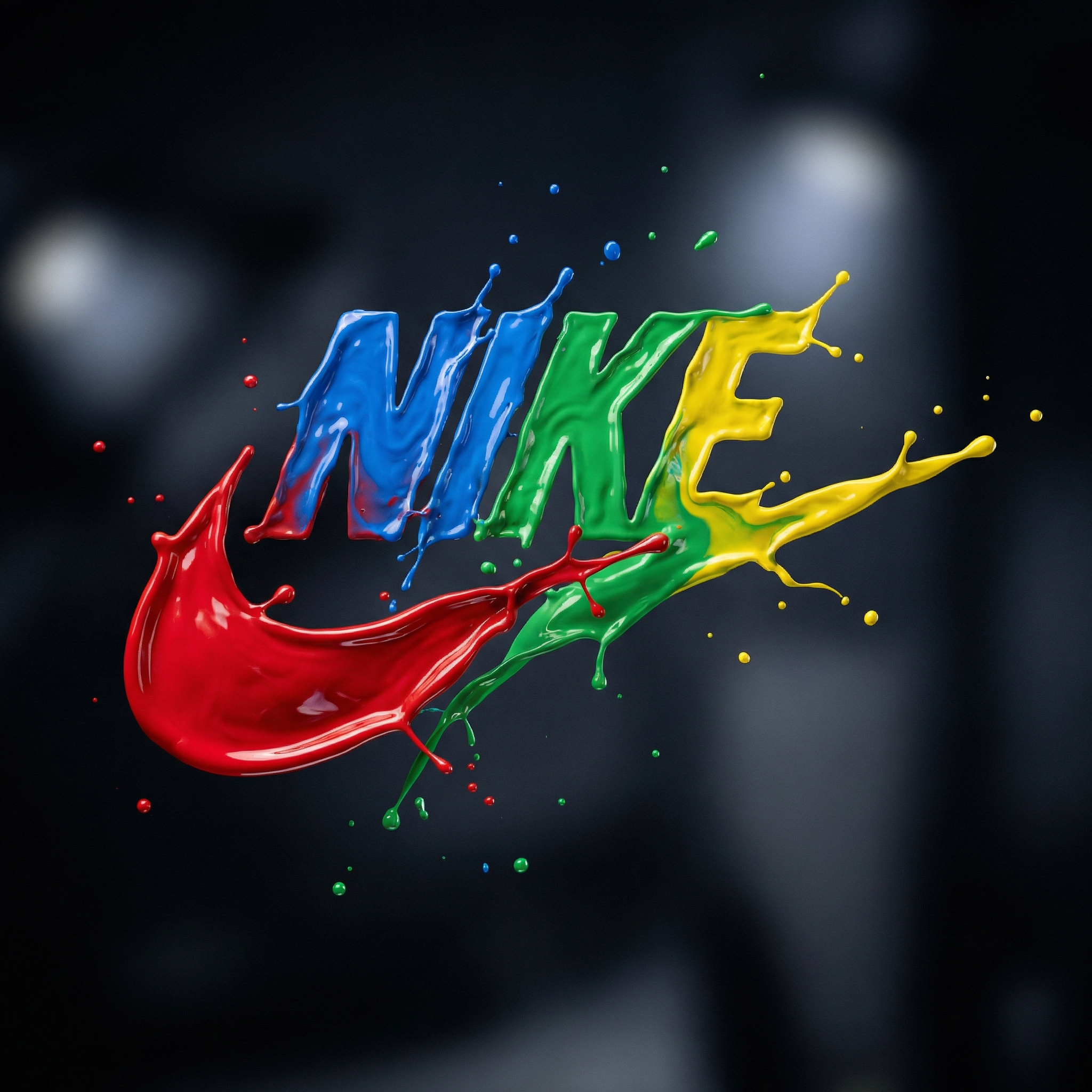
3 Core Concepts You Need to Understand
Concept 1: Liquid Sculpture — Why Paint Can "Hold" a Logo Shape
formed from four vibrant paint splashes triggers AI's understanding of "liquid forming." AI doesn't paint a logo then splash paint on top — it works in reverse, making the liquid itself become the logo shape.
Think of it like "water poured into a mold": liquid is the material, logo outline is the mold. sculpted from liquid paint reinforces this metaphor — "sculpted" implies the liquid was shaped by some force into a specific form, not randomly splashed.
Remove sculpted and AI tends toward random splatter, blurring the logo outline significantly.
Concept 2: Four-Color Distribution — Why Red, Blue, Green, Yellow
red, blue, green, and yellow isn't an arbitrary color choice. This combination serves two purposes:
- Maximum hue separation: Red (warm), blue (cool), green (natural), yellow (bright) cover four quadrants of the color wheel, maximizing chromatic richness
- RGB+Y on dark: All four colors achieve maximum contrast against dark backgrounds, each appearing to "self-illuminate"
each color flows dynamically across different parts of the logo tells AI the colors aren't blended into one mass — they occupy separate regions of the logo. This description prevents AI from mixing all four into a brown muddy puddle.
Concept 3: High-Speed Freeze — The Physics of "captured mid-motion"
captured mid-motion is the key to making the image feel real. These three words tell AI the scene was photographed by a high-speed camera at the exact moment of collision — the liquid is moving but frozen by the shutter.
This description produces three visual effects:
- Liquid edges have "tearing" quality — moving liquid edges aren't smooth
- Droplet sizes vary — large drops just separating from the main body, small ones already flying far
- Liquid surfaces show directional stretching — not static, rounded shapes
Without captured mid-motion, AI may generate a "static liquid sculpture" — smooth surfaces, perfect edges, zero splash energy.
Step 1: Choose Your Brand + Set the Color Scheme
1.1 Insert Your Brand Name
Replace [BRAND] with any brand name. AI recognizes famous logos with high accuracy:
| Brand | AI Recognition | Recommended Color Scheme | Visual Effect |
|---|---|---|---|
| Windows | Very high | Keep original red/blue/green/yellow | Four colors match brand identity perfectly |
| Nike | Very high | Red/blue/green/yellow (high contrast) | Swoosh curve creates elegant paint flow direction |
| Apple | High | Red/blue/green/yellow or single-gradient | Simple silhouette distributes paint evenly |
| Custom logo | Medium | Requires shape description | Add shaped like [shape description] |
1.2 Custom Color Replacement
To replace the default four colors with brand-specific colors:
formed from four vibrant paint splashes:
[primary brand color], [secondary color], [accent color],
and [highlight color]
Example for Coca-Cola: red, white, silver, and gold — red dominates, white/silver/gold serve as accents, aligning with brand identity.
Important: Keep exactly 4 colors. Fewer than 3 makes the image feel sparse; more than 5 creates visual chaos.
Step 2: Assemble the Prompt and Generate
2.1 Complete Prompt Template
Create a photograph of a [BRAND] logo formed from four
vibrant paint splashes: red, blue, green, and yellow,
captured mid-motion. Each color flows dynamically across
different parts of the logo, as if sculpted from liquid
paint. Droplets are suspended in the air around it,
enhancing the illusion of movement. Set against a dark
background with soft, vivid lighting that accentuates
the glossy texture and fluid motion.
2.2 Post-Generation Checklist
After generating, check each item:
- Is the logo recognizable? Without reading the prompt, can you identify the brand?
- If not → add
the logo shape is clearly recognizable and dominant
- If not → add
- Are all four colors visible? Or did one color overwhelm the others?
- If a color disappeared → add
each of the four colors occupies roughly equal area
- If a color disappeared → add
- Are there suspended droplets? Or is the liquid surface too smooth?
- If no droplets → add
hundreds of tiny paint droplets frozen in mid-air around the logo
- If no droplets → add
2.3 Common First-Attempt Failures and Fixes
| Failure Symptom | Cause | Fix |
|---|---|---|
| Logo melted into a blob | sculpted constraint too weak |
Add the logo shape is perfectly formed and clearly readable |
| Only 2-3 colors appear | AI merged colors during blending | Specify positions: red on the left, blue on the right, green on top, yellow on bottom |
| Liquid looks like plastic | Missing surface reflections | Add wet glossy surface reflecting studio lights |
| Background not dark enough | dark background got diluted |
Change to very dark black background |
Keys to First-Attempt Success
Key 1: Put the Brand Name at the Very Start
The earlier [BRAND] appears in the prompt, the more weight AI gives it. If you bury the brand name in the middle or end, AI may "finish painting the liquid" before remembering it needs a logo shape — resulting in the logo being swallowed by paint.
Key 2: Start With Simple Logos
For your first attempt, use geometrically simple logos (Nike, Apple, Target) rather than complex ones (Starbucks' mermaid). Simple shapes are far easier for AI to "carve" clearly inside flowing liquid. Master parameter control first, then challenge complex logos.
Key 3: Never Skip "glossy texture"
glossy texture is what makes liquid look like liquid. Without gloss, the paint looks matte — losing the viscosity and surface tension that real paint exhibits. These two words force AI to add specular highlight bands across the liquid surface, simulating real paint optics.
Level Up: 3 Variations on the Base Prompt
Variation 1: Metallic Paint Finish
Append: the paint has a metallic sheen with visible micro-sparkles
Effect: Liquid transforms from standard paint to metallic paint — micro-sparkle particles and metallic luster appear on the surface. Visual shifts from "color art" to "industrial finish," better suited for tech brands and automotive brands.
Variation 2: White Background Reversal
Replace dark background with: pure white background with soft shadows beneath the logo
Effect: Completely different mood — dark background delivers "explosive energy," white background delivers "fresh clarity." On white, colors appear more vibrant but no longer "glow," making it better for print output and stationery design.
Variation 3: Slow-Motion Flow
Replace captured mid-motion with: captured in extreme slow motion with long flowing paint trails
Effect: Liquid shifts from "frozen explosion" to "slow-motion trails" — each color stretches into long comet-like tails. Visual transforms from "burst freeze" to "elegant flow," better for fashion brands and cosmetics.
Test all 3 variations against the base prompt in nanobanana pro to compare the differences side by side.
5 Common Beginner Mistakes
Mistake 1: Vague Color Descriptions
❌ colorful paint splashes → AI may use only 2-3 colors
✅ four vibrant paint splashes: red, blue, green, and yellow → Explicitly list each color
Why: AI interprets "colorful" loosely, potentially choosing any subset. Listing specific color names gives precise control.
Mistake 2: Forgetting to Describe Droplets
Without droplets are suspended in the air, AI generates liquid with smooth, unbroken surfaces — looking like a "liquid model" rather than a "splash frozen in time." Suspended droplets are the visual key distinguishing "static liquid" from "dynamic splash."
Mistake 3: Background and Liquid Color Conflict
Dark blue background + blue liquid = blue region disappears. The background must contrast with all four paint colors. dark background (near-black) is the safest choice because all vivid colors reach maximum contrast against black.
Mistake 4: Logo Too Complex
Text logos (like Google's custom font) are much harder to liquify than symbol logos — AI must maintain letter stroke clarity inside flowing liquid, which is far more difficult than preserving a simple geometric shape. Start with symbol logos.
Mistake 5: Oversimplified Lighting
Just writing lighting isn't enough. In soft, vivid lighting, soft creates gentle reflections (not harsh point-source glare), while vivid preserves color saturation (preventing colors from washing out). Both modifiers are essential.
Interested in controlling light and material for liquid surfaces? Our glass fruit prompt breakdown explains transparent and semi-transparent material optics in detail.
FAQ
Can I use only 2 colors instead of 4?
Yes, but visual impact decreases. Two-color schemes suit brands with minimal palettes (Coca-Cola's red and white, Facebook's blue and white). Syntax: formed from two vibrant paint splashes: [color A] and [color B]. With fewer colors, add more droplet detail to compensate for the visual "emptiness."
What if the generated logo shape is inaccurate?
Add a shape description after the brand name: a Nike swoosh logo (a curved checkmark shape) formed from.... The parenthetical shape hint helps AI understand the logo's geometry. For lesser-known brands, this shape description is essential.
What backgrounds work besides dark?
Three safe options: very dark black (maximum contrast), dark charcoal gray (30% softer), pure white (complete mood reversal). Colored backgrounds are not recommended — background color creates chromatic interference with the four paint colors, reducing logo outline visibility.
What aspect ratio works best for this style?
Square 1:1 is the standard choice — logo centered with sufficient space for splash droplets. For stronger "explosion" energy, use 16:9 landscape to let droplets extend horizontally. 9:16 portrait is not ideal — paint splashes naturally spread horizontally, leaving empty vertical space above and below.
Want to see more creative brand logo visual effects? Our brand duel poster guide shows cinematic dual-brand logo confrontation compositions.