
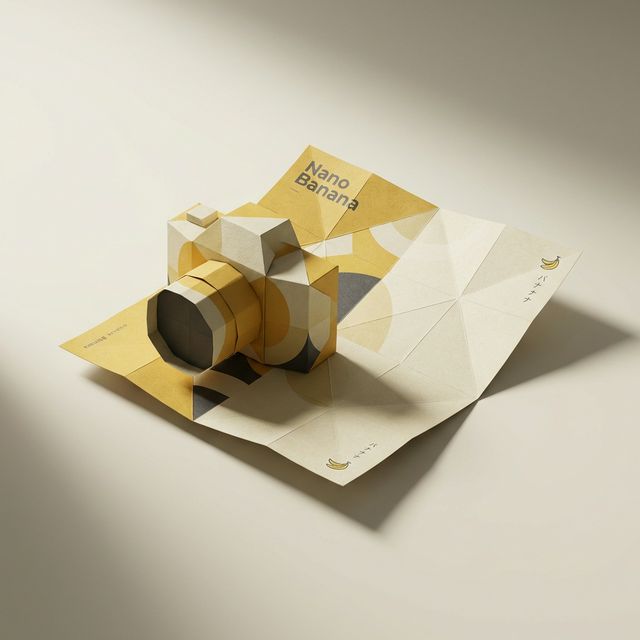
The branded paper folding 3D style seems simple—"paper folds into product." But it's one of the few AI prompt styles that triggers "process-state rendering."
Most AI prompts describe results ("a shoe," "a bag"). This prompt describes a process ("the moment paper is becoming a shoe"). This distinction changes AI's rendering logic entirely.
Technical Principle: Why These Words Produce This Effect
Complete Prompt
A flat branded paper folds itself into the full 3D shape of
a [PRODUCT], mid-motion. The paper colors match the [BRAND]
brand's signature palette. Dramatic studio lighting, origami
texture detail, soft gradient shadows. Stylized with Japanese
minimalism and elegant negative space. Clean, elevated
transformation, hyper-realistic.
Core Mechanism: mid-motion Triggers Process-State Rendering
mid-motion is the soul of this prompt. It tells AI: don't draw the finished origami—draw the in-between state of folding.
This triggers a completely different rendering path:
- Without mid-motion: AI generates a completed paper model—looks like an origami figure
- With mid-motion: AI must simultaneously render "flat paper portions" and "3D product portions," plus the transition zone between them
That transition zone is the most visually compelling part: paper edges curling, creases forming, flat surfaces converting to volume.
Topology Logic: Why AI Understands "One Sheet Becoming 3D"
A flat branded paper folds itself into the full 3D shape requires AI to understand a topological transformation:
- Start: A flat sheet (2D, with brand pattern and colors)
- End: A 3D product shape (shoe, bag, car)
- Current state: mid-motion (in transit from 1 to 2)
AI doesn't actually "fold" paper—through training data of origami works, paper art, and product photography, it understands the visual concept of "paper bending to approximate product contours." folds itself implies a spontaneous process, not hand-folding—adding a "magical" quality.
Prompt Engineering: Weights, Order, and Combination Logic
Weight Analysis: What's Deletable vs. Essential
| Phrase | Function | If Removed | Importance |
|---|---|---|---|
flat branded paper |
Define starting material | Becomes generic origami, loses brand feel | Essential |
folds itself into |
Define process action | Becomes static display, loses dynamism | Essential |
full 3D shape of [PRODUCT] |
Define target form | AI doesn't know what to fold into | Essential |
mid-motion |
Freeze in process | Becomes completed origami model | Core |
signature palette |
Brand color constraint | AI randomizes colors | Recommended |
dramatic studio lighting |
Light quality | Flat lighting, loses depth | Recommended |
origami texture detail |
Paper texture | Paper looks like smooth plastic | Recommended |
Japanese minimalism |
Composition style | Background may become cluttered | Optional |
hyper-realistic |
Render precision | Quality drops one tier | Optional |
Minimum viable prompt (essential words only):
A flat paper folds itself into a [PRODUCT], mid-motion.
These 6 core words trigger the effect, but without brand feel, lighting, or texture control.
origami texture vs. paper texture: Critical Distinction
origami texture: Triggers folding-specific visual features—creases, stress whitening at bends, fiber stretchingpaper texture: Triggers paper surface qualities—fiber grain, granularity, but no folding characteristics
Use the wrong one and paper looks flat with texture but lacks the physical suggestion of "being folded."
Brand Color Coherence Control
The paper colors match the [BRAND] brand's signature palette does something clever: it applies brand colors to both sides of the paper.
During folding, both front and back surfaces are exposed. Without specifying brand colors, AI might color the front but leave the back white—breaking the "this is a branded promotional sheet" narrative.
Advanced Control: Pixel-Level Precision
Controlling Fold Progress
mid-motion is a vague time point. Be more precise:
just beginning to fold: 90% still flat, only edges starting to liftmid-motion: ~50% complete (baseline)nearly complete, with a few flat sections remaining: 90% formed, few flat spots leftthe moment just before completion: One step from done, maximum tension
Each stage shows different "flat vs. 3D" ratios and shifts the visual center of gravity.
Controlling Fold Direction
By default, AI decides folding direction freely. Add constraints:
folding inward from all edges toward the center: Most common, four edges convergingrolling up from the bottom edge: Bottom-up roll—like "unfolding" in reversespiraling into shape: Spiral fold—more dynamic but less controllable
Controlling Lighting Drama
dramatic studio lighting is a bundled instruction. Unbundle for precision:
single key light from upper left: Single source, strongest contrastsoft rim lighting with subtle fill: Rim light + weak fill, softerflat even lighting: Even illumination, closest to catalog "descriptive" feel
Boundary Testing: Where This Style Breaks
Test 1: Product Complexity
Simple silhouettes (shoes, bags) work best. Complexity boundaries:
| Complexity | Example | Result |
|---|---|---|
| Simple | Sneakers, backpack | Perfect—clear silhouette, natural fold logic |
| Medium | Car, guitar | Good—large shape correct, details may simplify |
| Complex | Building, person | Difficult—AI can't explain complex topology with "one sheet" |
| Extreme | Trees, animals | Fails—organic forms conflict with origami's geometric logic |
Conclusion: This style works best for manufactured products (industrial design), not natural objects.
Test 2: Paper Material Variations
Baseline uses ordinary paper. Substitution experiments:
semi-transparent vellum: Stunning—folded layers create translucent overlap effectsmetallic foil paper: Increases premium feel, but folding "naturalness" decreasesnewspaper: Text + folding hybrid effect, great for media brandscarbon fiber sheet: Too rigid, AI struggles to render "bending"
Test 3: Brand Color Saturation
| Saturation | Brand Example | Origami Effect |
|---|---|---|
| High (red + black) | Nike Air Jordan | Most impactful, strong color contrast at creases |
| Medium (blue + white) | Adidas | Balanced, subtle color gradients at folds |
| Low (beige + gray) | Muji | Most zen, but weaker "brand" identity in paper |
Style Grafting Experiments
Graft 1: Origami + Glass Material
Append: the paper has a translucent glass-like quality
Effect: Paper becomes translucent—you can see through folded layers to internal structure. Great for tech brand "transparency" concepts.
Graft 2: Origami + Neon Glow
Append: with neon glowing edges at each fold crease
Effect: Every fold crease emits neon light—transforms "handmade paper craft" into "cyber origami." Great for gaming brands, esports visuals.
Graft 3: Origami + Ink Wash
Append: rendered in traditional Chinese ink wash painting style
Effect: Folding effect preserved, but rendered in ink wash—grayscale tones with "ink bleed" at creases. The ultimate Eastern aesthetic fusion.
Professional Workflow Tips
Tip 1: Test brand colors with a simple shape first
Use cube as [PRODUCT] to test how brand colors behave during folding. Cube folding logic is simplest and won't interfere with color judgment. Switch to actual product once satisfied.
Tip 2: Generate 3 fold stages
Generate just beginning to fold, mid-motion, and nearly complete as three separate images. Together they form an "evolution sequence"—perfect for brand animation keyframes or social media carousels.
Run three consecutive generations in nanobanana pro, changing only the fold stage description.
Tip 3: Add brand logo in post-production
AI-generated brand patterns may lack precision. Recommended workflow: generate brandless paper folding effect first, then overlay real logo and brand patterns onto the paper surface in design software.
FAQ
Why does my origami look like "crumpled paper" instead of "precise folding"?
Most likely origami texture is missing. Without it, AI defaults to random paper deformation; with it, AI generates regular, geometric fold patterns. Also ensure clean is present—it constrains AI to keep folds neat and orderly.
What's the difference between mid-motion and in progress?
mid-motion implies a frozen frame of rapid action—like high-speed photography capturing an instant. in progress suggests a slower process. Visually, mid-motion generates more "time-frozen" tension, while in progress feels calmer. For brand posters, use mid-motion.
Can this style be animated?
A single image can't become animation directly, but generating 5-8 different fold stages of the same product creates "stop-motion" effect when sequenced. Just modify the fold progress description for each frame while keeping other parameters constant.
Which brand color schemes work best with paper folding?
High-contrast two-color combinations perform best (like Nike's red + black, Hermès' orange + brown). Reason: folding exposes both paper surfaces, and two colors give each fold face a distinct color identity. Single-color brands (like Apple's white) must rely on lighting for depth, which is harder to achieve.
Why doesn't my complex product look right?
This style has a "topology complexity ceiling." Physical paper folding can't express all 3D forms. Solutions: simplify complex products to their iconic silhouette (e.g., car as side profile only), or accept AI's "artistic simplification"—an origami car doesn't need every component to be precise.